The Go Away Funny Doormat: A Subtle Statement for Your Threshold
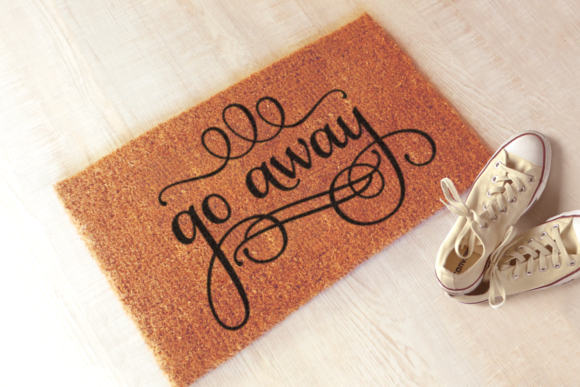
The classic doormat has long been a passive, welcoming object, quietly absorbing dirt and offering a generic "welcome." But in recent years, a new breed of entryway decor has emerged, blending humor, personality, and a dash of cheeky defiance. The Go Away Funny Doormat, particularly designs featuring the phrase in a fancy, ornate script, represents this shift perfectly. It's more than just a mat; it's a first impression, a boundary setter, and a piece of personalized art for your home's entrance.
Why a "Go Away" Doormat Captures Attention
People are drawn to this concept for several reasons. For the homeowner, it's a way to inject personality into an often overlooked space, signaling a sense of humor or a clear, albeit polite, desire for privacy. For creators, small business owners, and marketers, such a design is a popular product with proven appeal, ideal for custom merchandise, gifts, or boutique offerings. The ornate script elevates it from a simple joke to a stylish decorative element, making it suitable for a wider range of homes, from modern apartments to more traditional settings.
However, the availability of the design in multiple file formats—SVG, PNG, and DXF—opens up both opportunities and potential pitfalls. This versatility is a boon for professionals looking to apply the design to physical products or digital media, but navigating these formats without clear understanding can lead to frustrating outcomes. The journey from downloading a file to having a perfect finished product is where many well-intentioned projects stumble.
Navigating File Formats: The Core Technical Consideration
A common and critical oversight is treating the different file formats as interchangeable. They are not. Each serves a distinct purpose, and choosing the wrong one can waste time, money, and materials.
The SVG (Scalable Vector Graphic) is a vector file. This means it’s composed of mathematical paths, not pixels. It can be resized to any dimension—from a tiny keychain to a large patio mat—without any loss of quality or sharpness. This format is essential for professional fabrication using CNC machines, laser cutters, vinyl plotters, or for web design where scalability is key. A mistake here is using a PNG for a laser cutting project, resulting in blurry, jagged edges because the machine needs clean vector paths.
The PNG (Portable Network Graphic) is a raster image file. It’s made of a fixed grid of pixels. It’s perfect for direct digital use: posting on social media, using in a blog graphic, or simple printing on standard paper. Its background is typically transparent, which is helpful for overlays. The pitfall? Attempting to enlarge a PNG significantly for a large physical sign. The image will become pixelated and blurry, ruining the detail of that ornate script.
The DXF (Drawing Exchange Format) is another vector file, widely used in computer-aided design (CAD) and manufacturing, particularly with CNC routers and plasma cutters. It excels in translating the design’s outlines into precise cutting instructions for metal, wood, or acrylic. A misunderstanding occurs if someone without CAD software tries to open a DXF file expecting to see a rendered image; it will appear as line data in a specialized program.
A Practical Workflow to Avoid Format Frustration
Before you even download, clarify your end goal. Ask yourself: Is this for a digital screen or a physical object?
- For digital uses (web, simple print-on-paper): download and use the PNG.
- For custom fabrication (laser-cut wood signs, engraved metal, vinyl decals): you need a vector file. Use the SVG if your software supports it (like Illustrator or Inkscape), or the DXF if you are working directly in a CAD program like AutoCAD or VCarve.
- For large-scale printing (a big fabric mat via a print service): communicate with your printer. They often require high-resolution raster files (a very large PNG at 300 DPI) or specific vector formats. Don’t assume; send them a sample of the SVG and ask for their preference.
Beyond the File: Application and Context Mistakes
Even with the correct file, other subtle errors can diminish the impact of your Go Away Funny Doormat.
First, ignoring the background context. That ornate script is elegant, but its readability and tone depend on its surroundings. Placing a white script design on a light-colored mat will make it vanish. Always test the visual contrast. A better approach is to mock up the design on your intended background color using simple software before committing to production. For digital use, ensure the transparent PNG is overlayed on a contrasting background so the phrase pops.
Second, misjudging the scale and placement. On a physical doormat, the design needs to be sized appropriately to fit the space while remaining legible from a standing height. A tiny, intricate script placed on a vast mat loses its presence. Conversely, an overwhelmingly large design can look clumsy. Measure your actual mat dimensions and scale the design proportionally within your editing software.
Third, overlooking material compatibility. If you’re creating a custom object, the material affects the design’s execution. The fine details of an ornate script may not survive being cut from a coarse, fibrous material. They will excel on smooth acrylic, polished metal, or fine vinyl. Consult with your fabricator about the best material to preserve the design’s fidelity.
Ensuring Quality and Satisfaction: The Pre-Decision Checklist
To ensure your project with the Go Away Funny Doormat design is successful, pause and check these points before proceeding.
- Final Use: Have you definitively decided on digital or physical application? This locks in your required file format.
- Software Access: Do you have, or know how to access, the software needed to edit the file you’re downloading (e.g., vector editor for SVG, CAD for DXF)?
- Fabricator Communication: If outsourcing production, have you shared the file with the maker and confirmed it’s suitable for their process and your chosen material?
- Context Mock-up: Have you visually tested the design on its final background for contrast and legibility?
- Scale Proof: For physical items, have you calculated the appropriate size for your specific product dimensions?
The Better Approach: Think Like a Producer
The most successful users of this design treat it not just as a download, but as a component in a production pipeline. They start with the end product in mind and work backwards to select the correct tools and processes. An entrepreneur making wooden signs will secure the DXF file, confirm their CNC machine can read it, and test a cut on a sample piece before running a full batch. A blogger will take the PNG, place it on a dark background for their website header, and ensure it’s compressed properly for fast loading. This proactive, pipeline thinking turns a fun idea into a polished, professional result.
Turning a Humorous Concept into a Polished Reality
The appeal of the Go Away Funny Doormat lies in its blend of wit and style. By paying close attention to the technical details of the file formats and the practical considerations of application, you can fully realize that appeal. Avoiding the common pitfalls of format confusion, context neglect, and scale misjudgment saves resources and ensures the final product—whether a digital graphic, a custom-cut sign, or a printed mat—delivers its humorous message with clarity and quality. Remember, the goal is for the design to speak loudly in its ornate script, not for your process to silently whisper about overlooked mistakes.